Showing posts with label mic. Show all posts

Monday, January 5, 2015

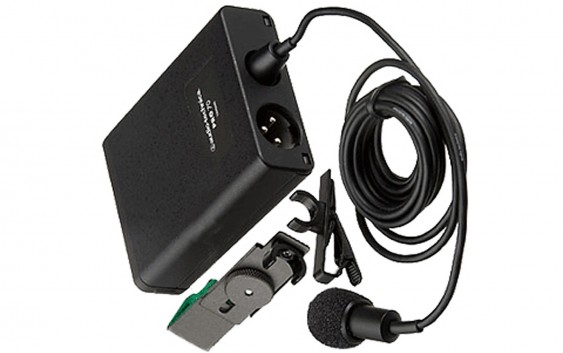
Review of the Pro 70 Lavalier Condenser Microphone from Audio Technica

My current preferred lav is the Pro 70 lavalier microphone from Audio Technica. It's a low to mid-budget microphone, not wireless, so you'll hopefully pay less than $150 for it. It's been working decently for me, so I thought I'd do a quick overview.


This isn't an overly technical review, with all kinds of lab-testing of audio recordings. I've just covered all the basics, and talked about lav mics in general. It has a reduced dynamic pickup range compared to any studio condenser microphone that you'd buy, at around 100 Hz to 14 kHz, but that's standard for a lavalier and you'll have pretty decent quality for whatever project you're working on. If you want to just watch the video review, here's the link, although I'll also include the specs of these mics further down in this blog post:


Here is the general overview of the Pro 70, taken directly from the Audio Technica website:

This miniature condenser microphone achieves full-sounding pickup and is known for outstanding consistency and dependable performance. Supplied with both a clothing clip and guitar mount, it provides natural and articulate vocal reproduction when used as a clip-on lavalier and excels in pickup of acoustic guitar. The PRO 70 is designed to make music and speech clearly and comfortably audible, yet never draw attention to itself or its operation. The microphone is equipped with a low-frequency roll-off switch that allows for reduced pickup of room noise. The versatile PRO 70 may be powered by either battery or phantom power. Its cardioid polar pattern reduces pickup of sounds from the sides and rear, improving isolation of the desired sound source.


Here is a general list of features of the Pro 70:

- Miniature condenser microphone is ideal for both vocal and acoustic guitar applications
- Natural and articulate vocal reproduction when used as a clip-on lavalier—clothing clip included
- Excels in pickup of acoustic guitar with included instrument adapter
- Cardioid polar pattern reduces pickup of sounds from the sides and rear, improving isolation of desired sound source
- Switchable low-frequency roll-off
- Corrosion-resistant contacts from gold-plated XLRM-type connector
- Operates on battery or phantom power
- 6' (1.8 m) cable permanently attached between microphone and power module


Here is a general list of the technical specifications of the Pro 70:

- Element Pattern: Fixed-charge back plate, permanently polarized condenser
- Polar Pattern: Cardioid
- Frequency Response: 100-14,000 Hz
- Low Frequency Roll-Off: 80 Hz, 8 dB/octave
- Phantom: -45 dB (5.6 mV) re 1V at 1 Pa
- Battery: -45 dB (5.6 mV) re 1V at 1 Pa
- Impedance Phantom: 200 ohms
- Impendance Battery: 200 ohms
- Maximum Input Sound Level: Phantom: 123 dB SPL, 1 kHz at 1% T.H.D. Battery: 123 dB SPL, 1 kHz at 1% T.H.D.
- Typical Dynamic Range: Phantom: 96 dB, 1 kHz at Max SPL. Battery: 96 dB, 1 kHz at Max SPL
- Signal to Noise Ratio: 67 dB, 1 kHz at 1 Pa
- Phantom Power Requirements: 11-52V DC, 2 mA typical
- Battery Type: 1.5V AA/UM3
- Battery Current/Life: 0.4 mA / 1200 hours typical (alkaline)
- Switch: Off, on-flat, on-roll-off
- Weight of Microphone: 0.3 oz (8 g)
- Weight of Power Module: 4.7 oz (134 g)
- Dimensions of Microphone: 0.98" (25.0 mm) long, 0.40" (10.2 mm) diameter
- Dimensions of Power Module: 3.27" (83.0 mm) H x 2.48" (63.0 mm) W x 0.87" (22.0 mm) D
- Output Connector: Integral 3-pin XLRM-type
- Cable: Integral 6' (1.8 m), permanently attached between microphone and power module
- Accessories furnished: AT8411 clothing clip; AT8444 instrument adapter; power module; windscreen; battery; soft protective pouch
- Audio Technica Case Style: M1


As I've mentioned, I've owned the Pro 70 for a while now and I've been pleased with it, so I figured it was worth a review.


I'm Jonathan Clark, known online as DJ Bolivia.  Do you want to learn more about DJ'ing and music production?  If so, visit:


If you happen to enjoy techno tracks, most of my tracks are available as free downloads from this link:


Thanks so much for visit, and for your support!  I really appreciate the fan base that I've been able to build up over the years.

Also, if you want to visit any of my other sites, here are a few links:
    YouTube:  youtube.com/djbolivia
    SoundCloud:  soundcloud.com/djbolivia
    Blogger:  djbolivia.blogspot.com
    Main Site:  www.djbolivia.ca

Sunday, January 4, 2015

Review of the Blue Spark & Spark Digital Condenser Microphones

For a mid-budget home studio voiceover/vocal microphone, my preferred choice is currently one of two condenser mics from Blue Microphones, either the Spark or the Spark Digital. I've had the Spark Digital for a long time and just recently got the regular Spark to add to my gear. 


These microphones retail for around $200-250 in Canada. I'm quite impressed with the Blue microphones, and they've also gotten good reviews from a lot of other people, so I decided to do a review of my own. These microphones are more expensive than the most basic low-end mics out there, but I feel that spending a bit of extra money is worth it, and you'll have pretty decent quality for whatever project you're working on. If you want to just watch the video review, here's the link, although I'll also include the specs of these mics further down in this blog post:


Here is the general overview of the Spark, taken directly from the Blue Microphones website:

Blue's newest professional mic, Spark, is a cardioid, solid-state condenser microphone designed to help you achieve professional quality recordings in any creative environment. Spark features a custom-designed condenser capsule with Class-A discrete electronics resulting in superbly detailed and uncolored output, making it the ideal microphone for recording vocals, drums, guitars, pianos, brass, woodwinds, and just about anything else you can light a fire under.

A new feature found only on the Spark microphone is the unique Focus Control, providing two different usage modes at the push of a button: the Normal mode (out position) providing increased low frequency sensitivity for recordings with great impact and definition, along with the Focus mode, (in position) for even greater clarity and detail.

The Spark microphone ships with a custom-designed pop-filter and shockmount as well as a convenient and stylish wood case for transport. With Spark, you've got everything you need to make professional recordings, all in one package.


Here is a general list of features of the Spark:

- Transducer: Condenser
- Polar Patern: Cardioid
- Frequency Response: 20Hz - 20kHz
- Sensitivity: 28 mV/Pa
- Output Impedance: 50 Ohms
- Rated Load Impedance: Not less than 1kOhm
- Maximum SPL: 128 dB
- S/N Ratio: S/N Ratio: 84 dB
- Noise Level: 10dB [A weighted]
- Power REquirement: +48V DC Phantom Power
- Weight: 1.25 lbs.
- Dimensions: Length - 7.76 inches; Diameter - 1.77 inches


The Spark Digital is good for USB 2.0+, 30-pin, or Lightning connections. You MUST specify which of these connections you need when ordering, as it doesn't come with all three choices! Of course, you can buy the separate cords if you want to be able to use two or three different types of connections.


As I've mentioned, I've owned Spark Digital for a while now and I've been pleased with it, so I figured it was worth a review. Also interesting is that although Blue says that the internal specs of the two microphones are the same, their website lists a frequency response of 26 Hz to 20 kHz for the Spark Digital, rather than a low of 20 Hz. Perhaps this is a typo?


I'm Jonathan Clark, known online as DJ Bolivia.  Do you want to learn more about DJ'ing and music production?  If so, visit:


If you happen to enjoy techno tracks, most of my tracks are available as free downloads from this link:


Thanks so much for visit, and for your support!  I really appreciate the fan base that I've been able to build up over the years.

Also, if you want to visit any of my other sites, here are a few links:
    YouTube:  youtube.com/djbolivia
    SoundCloud:  soundcloud.com/djbolivia
    Blogger:  djbolivia.blogspot.com
    Main Site:  www.djbolivia.ca

Review of the RØDE NTG2 Directional Shotgun Microphone

For a mid-budget directional shotgun microphone, my preferred choice is RØDE's NTG2 condenser microphone. 


I bought this a while ago after researching a number of mid-range directional microphones in the budget range of around $250-300. I've been happy with the performance of this microphone, so I decided to do a review. This microphone is more expensive than the most basic low-end directional microphones out there, but I feel that spending a bit of extra money is worth it, and you'll have pretty decent quality for whatever project you're working on. If you want to just watch the video review, here's the link, although I'll also include the NTG2's specs further down in this blog post:


Here is a general list of features of this microphone, taken directly from the RØDE website:

- Broadcast sound quality
- Low noise circuitry
- Condenser transducer
- Rugged metal construction
- Two step High Pass Filter (Flat/80Hz)
- P48 phantom power or AA battery option
- Low handling noise
- Low weight - 161g (5.17 oz.)
- Includes mic clip, wind shield and zip case
- Ideal for professional applications within the film, video, television and production industries
- 10 year extended warranty with online registration


Here are some of the specs of this particular microphone:

- Acoustic Principle: Line Gradient
- Active Electronics: JFET impedance convertor with balanced transformer output
- Capsule: 0.50"
- Polar Pattern: Supercardioid
- Address Type: End
- Frequency Range: 20Hz - 20kHz(selected HPF @0)
- Output Impedance: 250Ω
- Maximum SPL: 131dB SPL (@ 1kHz, 1% THD into 1KΩ load)
- Maximum Output Level: 6.9dBu (@ 1kHz, 1% THD into 1KΩ load
- Sensitivity: -36.0dB re 1 Volt/Pascal (15.00mV @ 94 dB SPL) +/- 2 dB @ 1kHz
- Equivalent Noise Level (A-weighted): 18dB-A
- Power Options: AA Battery+48V phantom power
- Weight: 161.00gm
- Dimensions: 280.00mmH x 22.00mmW x 22.00mmD
- Output: XLR Output
- Warranty: 1 year with free extension to 10 years following online registration


As I've mentioned, I've owned this for a while now and I've been pleased with it, so I figured it was worth a review.

I'm Jonathan Clark, known online as DJ Bolivia.  Do you want to learn more about DJ'ing and music production?  If so, visit:


If you happen to enjoy techno tracks, most of my tracks are available as free downloads from this link:


Thanks so much for visit, and for your support!  I really appreciate the fan base that I've been able to build up over the years.

Also, if you want to visit any of my other sites, here are a few links:
    YouTube:  youtube.com/djbolivia
    SoundCloud:  soundcloud.com/djbolivia
    Blogger:  djbolivia.blogspot.com
    Main Site:  www.djbolivia.ca

Saturday, February 15, 2014

Exploring USB Microphones


I just uploaded part eleven of my Audio Recording tutorial series (and I have some additional study notes further down in this post). This series as a whole is more related to home studio work than it is to DJ'ing, covering the very basics of audio engineering and production work. 

If you're just discovering this tutorial series and you want to start at the beginning, visit:  djbolivia.ca/audiorecording


Audio Recording Tutorial #11: Working with USB Microphones

In this video, we examine the basic characteristics and features that you might find on many USB microphones, and the advantages and disadvantages that they have compared to traditional studio microphones.


Here are some of the pros and cons of using a USB microphone as compared to a traditional mic routed in through a sound card (I'll start with advantages for the USB microphones):
- Excellent quality is available at very competitive costs.
- USB mics are suitable for most podcasters, home musicians, music students, voiceover talent, and pretty much anyone not wanting to use the internal microphone of your laptop. USB mics even have a place in some professional studios.
- No need for a mic pre-amp.
- Condenser microphones normally need a source of phantom power. This is supplied on the USB line for a USB mic.
- Some USB mics allow for direct headphone monitoring with no latency.
- Many USB microphones have a gain control knob to adjust signal going into your computer.
- Many USB microphones offer the choice between multiple pickup patterns.
- Some of the higher-end USB mics also allow for XLR output into a traditional system.
- Some USB microphones offer variable sampling rates onboard.
- Some USB microphones have a built-in pop filter.

There are a few potential disadvantages to consider too:
- Although some USB mics will work immediately as plug-and-play devices, you may need to install drivers for others (this is the case on both PC's and Macs).
- Many DAW's will only allow for input from a single device at a time. So for instance, if you've got a USB mic plugged into your computer and you also have a sound card hooked up, with other instruments connected to your sound card, you may not be able to record through your USB mic and sound card simultaneously! This is certainly not a problem if you're working on multi-track sessions where each type of audio data is recorded individually. However, if you wanted to, for example, bring in a vocal through the USB mic at the same time as a guitar track through your soundcard, you might be out of luck!

Links relating to USB microphones:


Here are links to a number of microphone manufacturers:


To see the rest of the tutorials in this Audio Recording series, visit:


Thanks so much for visit, and for your support!  I really appreciate the fan base that I've been able to build up over the years.

Also, if you want to visit any of my other sites, here are a few links:
    YouTube:  youtube.com/djbolivia
    SoundCloud:  soundcloud.com/djbolivia
    Blogger:  djbolivia.blogspot.com
    Main Site:  www.djbolivia.ca