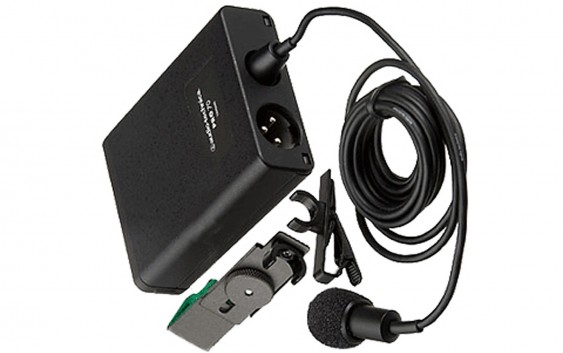
This isn't an overly technical review, with all kinds of lab-testing of audio recordings. I've just covered all the basics, and talked about lav mics in general. It has a reduced dynamic pickup range compared to any studio condenser microphone that you'd buy, at around 100 Hz to 14 kHz, but that's standard for a lavalier and you'll have pretty decent quality for whatever project you're working on. If you want to just watch the video review, here's the link, although I'll also include the specs of these mics further down in this blog post:
Here is the general overview of the Pro 70, taken directly from the Audio Technica website:
This miniature condenser microphone achieves full-sounding pickup and is known for outstanding consistency and dependable performance. Supplied with both a clothing clip and guitar mount, it provides natural and articulate vocal reproduction when used as a clip-on lavalier and excels in pickup of acoustic guitar. The PRO 70 is designed to make music and speech clearly and comfortably audible, yet never draw attention to itself or its operation. The microphone is equipped with a low-frequency roll-off switch that allows for reduced pickup of room noise. The versatile PRO 70 may be powered by either battery or phantom power. Its cardioid polar pattern reduces pickup of sounds from the sides and rear, improving isolation of the desired sound source.
Here is a general list of features of the Pro 70:
- Miniature condenser microphone is ideal for both vocal and acoustic guitar applications
- Natural and articulate vocal reproduction when used as a clip-on lavalier—clothing clip included
- Excels in pickup of acoustic guitar with included instrument adapter
- Cardioid polar pattern reduces pickup of sounds from the sides and rear, improving isolation of desired sound source
- Switchable low-frequency roll-off
- Corrosion-resistant contacts from gold-plated XLRM-type connector
- Operates on battery or phantom power
- 6' (1.8 m) cable permanently attached between microphone and power module
Here is a general list of the technical specifications of the Pro 70:
- Element Pattern: Fixed-charge back plate, permanently polarized condenser
- Polar Pattern: Cardioid
- Frequency Response: 100-14,000 Hz
- Low Frequency Roll-Off: 80 Hz, 8 dB/octave
- Phantom: -45 dB (5.6 mV) re 1V at 1 Pa
- Battery: -45 dB (5.6 mV) re 1V at 1 Pa
- Impedance Phantom: 200 ohms
- Impendance Battery: 200 ohms
- Maximum Input Sound Level: Phantom: 123 dB SPL, 1 kHz at 1% T.H.D. Battery: 123 dB SPL, 1 kHz at 1% T.H.D.
- Typical Dynamic Range: Phantom: 96 dB, 1 kHz at Max SPL. Battery: 96 dB, 1 kHz at Max SPL
- Signal to Noise Ratio: 67 dB, 1 kHz at 1 Pa
- Phantom Power Requirements: 11-52V DC, 2 mA typical
- Battery Type: 1.5V AA/UM3
- Battery Current/Life: 0.4 mA / 1200 hours typical (alkaline)
- Switch: Off, on-flat, on-roll-off
- Weight of Microphone: 0.3 oz (8 g)
- Weight of Power Module: 4.7 oz (134 g)
- Dimensions of Microphone: 0.98" (25.0 mm) long, 0.40" (10.2 mm) diameter
- Dimensions of Power Module: 3.27" (83.0 mm) H x 2.48" (63.0 mm) W x 0.87" (22.0 mm) D
- Output Connector: Integral 3-pin XLRM-type
- Cable: Integral 6' (1.8 m), permanently attached between microphone and power module
- Accessories furnished: AT8411 clothing clip; AT8444 instrument adapter; power module; windscreen; battery; soft protective pouch
- Audio Technica Case Style: M1
As I've mentioned, I've owned the Pro 70 for a while now and I've been pleased with it, so I figured it was worth a review.
Here is the general overview of the Pro 70, taken directly from the Audio Technica website:
This miniature condenser microphone achieves full-sounding pickup and is known for outstanding consistency and dependable performance. Supplied with both a clothing clip and guitar mount, it provides natural and articulate vocal reproduction when used as a clip-on lavalier and excels in pickup of acoustic guitar. The PRO 70 is designed to make music and speech clearly and comfortably audible, yet never draw attention to itself or its operation. The microphone is equipped with a low-frequency roll-off switch that allows for reduced pickup of room noise. The versatile PRO 70 may be powered by either battery or phantom power. Its cardioid polar pattern reduces pickup of sounds from the sides and rear, improving isolation of the desired sound source.
Here is a general list of features of the Pro 70:
- Miniature condenser microphone is ideal for both vocal and acoustic guitar applications
- Natural and articulate vocal reproduction when used as a clip-on lavalier—clothing clip included
- Excels in pickup of acoustic guitar with included instrument adapter
- Cardioid polar pattern reduces pickup of sounds from the sides and rear, improving isolation of desired sound source
- Switchable low-frequency roll-off
- Corrosion-resistant contacts from gold-plated XLRM-type connector
- Operates on battery or phantom power
- 6' (1.8 m) cable permanently attached between microphone and power module
Here is a general list of the technical specifications of the Pro 70:
- Element Pattern: Fixed-charge back plate, permanently polarized condenser
- Polar Pattern: Cardioid
- Frequency Response: 100-14,000 Hz
- Low Frequency Roll-Off: 80 Hz, 8 dB/octave
- Phantom: -45 dB (5.6 mV) re 1V at 1 Pa
- Battery: -45 dB (5.6 mV) re 1V at 1 Pa
- Impedance Phantom: 200 ohms
- Impendance Battery: 200 ohms
- Maximum Input Sound Level: Phantom: 123 dB SPL, 1 kHz at 1% T.H.D. Battery: 123 dB SPL, 1 kHz at 1% T.H.D.
- Typical Dynamic Range: Phantom: 96 dB, 1 kHz at Max SPL. Battery: 96 dB, 1 kHz at Max SPL
- Signal to Noise Ratio: 67 dB, 1 kHz at 1 Pa
- Phantom Power Requirements: 11-52V DC, 2 mA typical
- Battery Type: 1.5V AA/UM3
- Battery Current/Life: 0.4 mA / 1200 hours typical (alkaline)
- Switch: Off, on-flat, on-roll-off
- Weight of Microphone: 0.3 oz (8 g)
- Weight of Power Module: 4.7 oz (134 g)
- Dimensions of Microphone: 0.98" (25.0 mm) long, 0.40" (10.2 mm) diameter
- Dimensions of Power Module: 3.27" (83.0 mm) H x 2.48" (63.0 mm) W x 0.87" (22.0 mm) D
- Output Connector: Integral 3-pin XLRM-type
- Cable: Integral 6' (1.8 m), permanently attached between microphone and power module
- Accessories furnished: AT8411 clothing clip; AT8444 instrument adapter; power module; windscreen; battery; soft protective pouch
- Audio Technica Case Style: M1
As I've mentioned, I've owned the Pro 70 for a while now and I've been pleased with it, so I figured it was worth a review.
I'm Jonathan Clark, known online as DJ Bolivia. Do you want to learn more about DJ'ing and music production? If so, visit:
If you happen to enjoy techno tracks, most of my tracks are available as free downloads from this link:
Thanks so much for visit, and for your support! I really appreciate the fan base that I've been able to build up over the years.
Also, if you want to visit any of my other sites, here are a few links:
YouTube: youtube.com/djbolivia
SoundCloud: soundcloud.com/djbolivia
Blogger: djbolivia.blogspot.com
Main Site: www.djbolivia.ca


